> ## Documentation Index
> Fetch the complete documentation index at: https://docs.usebruno.com/llms.txt
> Use this file to discover all available pages before exploring further.
# Request headers
Request headers are **key-value** pairs sent with an HTTP request so the server knows how to process it.
Bruno splits the Headers tab into two groups:
* **Runtime Headers** - headers Bruno adds on every request as runtime headers (for example `User-Agent`, `Accept`, `Accept-Encoding`).
* **Request Headers** - headers you add yourself. These can be standard HTTP headers or custom names.
The headers that go on the wire match what this tab shows. Disabled runtime headers are not sent.
## Create request headers
1. Open a request in a collection.
2. Open the **Headers** tab.
3. Under **Request Headers**, enter **Name**, **Value**, and an optional **Description**.
4. Save and send the request.
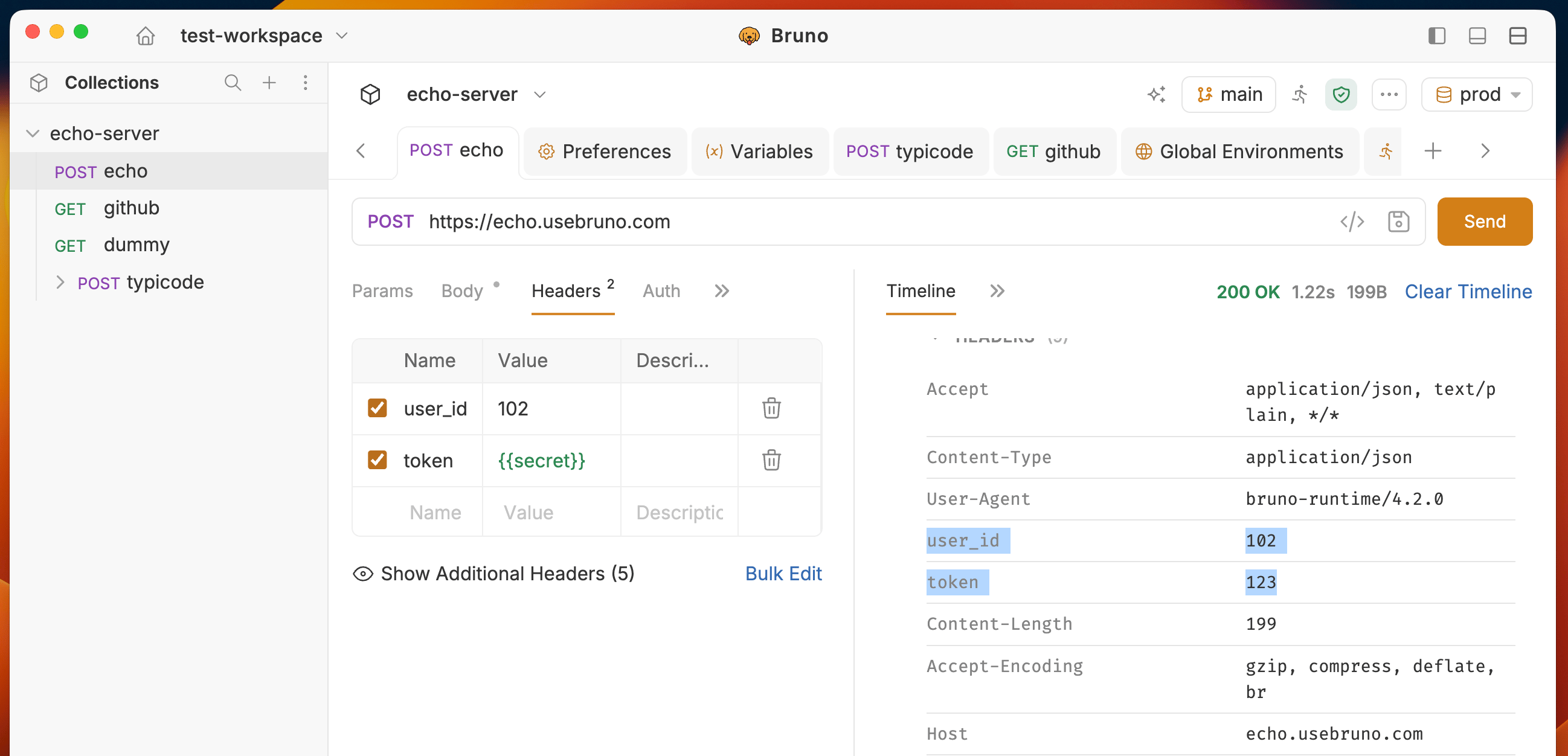 Use **Bulk Edit** in the bottom-right of the tab to edit several headers as text.
## Runtime (default) headers
Default headers are sent with every request. You can see and disable some default headers in Bruno. `Host` is required by HTTP and cannot be disabled. Its checkbox is disabled.
The Headers tab lists every inherited header that will be sent. Click **Show Additional Headers** to view them.
Use **Bulk Edit** in the bottom-right of the tab to edit several headers as text.
## Runtime (default) headers
Default headers are sent with every request. You can see and disable some default headers in Bruno. `Host` is required by HTTP and cannot be disabled. Its checkbox is disabled.
The Headers tab lists every inherited header that will be sent. Click **Show Additional Headers** to view them.
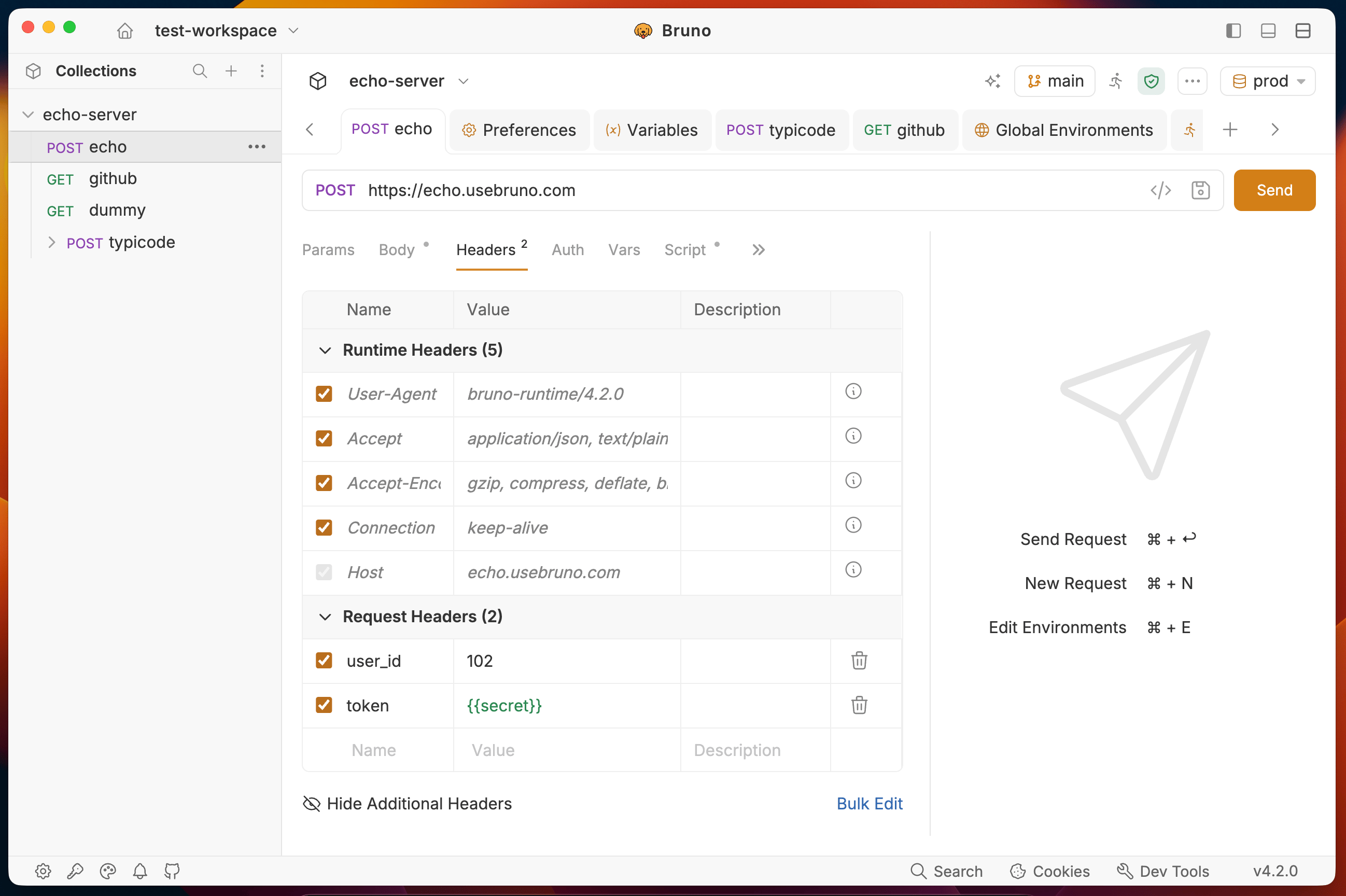 Typical default headers include:
| Header | Example value |
| - | - |
| `User-Agent` | `bruno-runtime/` |
| `Accept` | `application/json, text/plain, */*` |
| `Accept-Encoding` | `gzip, compress, deflate, br` |
| `request-start-time` | Set at runtime |
| `Connection` | `keep-alive` |
| `Host` | Derived from the request URL |
### Disable a default header
1. Open **Runtime Headers**.
2. Clear the checkbox next to the header you do not want to send (for example `User-Agent`).
3. Send the request.
The disabled header is omitted from the outgoing request. The [Timeline](/send-requests/res-data-cookies/debugging/timeline) shows the request that actually went on the wire.
`Host` is required by HTTP and cannot be disabled. Its checkbox is disabled.
Inherited header on/off state is stored per request. Disabling `User-Agent` on one request does not change other requests in the collection.
## Streaming with Server-Sent Events
To work with Server-Sent Events (SSE), set:
```
Accept: text/event-stream
```
Bruno keeps the connection open, streams chunks into the response panel live, and swaps the Send button for Cancel while the stream is active. See [Server-Sent Events (SSE)](/send-requests/REST/sse) for details on cancellation, collection runs, and CLI behavior.
Typical default headers include:
| Header | Example value |
| - | - |
| `User-Agent` | `bruno-runtime/` |
| `Accept` | `application/json, text/plain, */*` |
| `Accept-Encoding` | `gzip, compress, deflate, br` |
| `request-start-time` | Set at runtime |
| `Connection` | `keep-alive` |
| `Host` | Derived from the request URL |
### Disable a default header
1. Open **Runtime Headers**.
2. Clear the checkbox next to the header you do not want to send (for example `User-Agent`).
3. Send the request.
The disabled header is omitted from the outgoing request. The [Timeline](/send-requests/res-data-cookies/debugging/timeline) shows the request that actually went on the wire.
`Host` is required by HTTP and cannot be disabled. Its checkbox is disabled.
Inherited header on/off state is stored per request. Disabling `User-Agent` on one request does not change other requests in the collection.
## Streaming with Server-Sent Events
To work with Server-Sent Events (SSE), set:
```
Accept: text/event-stream
```
Bruno keeps the connection open, streams chunks into the response panel live, and swaps the Send button for Cancel while the stream is active. See [Server-Sent Events (SSE)](/send-requests/REST/sse) for details on cancellation, collection runs, and CLI behavior.